
Claude AI: What It Is, How It Works, Models, And Use Cases For L&D Teams
Claude AI is becoming an important tool for Instructional Designers as they adapt to using it to create learning content. The main challenge now is not finding AI tools but knowing which ones provide high-quality, structured learning. Designed to focus on safety and long-form reasoning, it excels at handling complex materials such as policies, course content, and knowledge bases.
For professionals, it’s key to ask questions like who owns Claude AI or how the different Claude models compare, and this is what we’re here for. This guide does more than just explain what Claude is. It shows you how and when to use it to create a smarter and more efficient learning strategy.
Table Of Contents
What Is Claude AI?
Claude AI is a chatbot created by Anthropic that focuses on generating safe, reliable, and detailed content. This makes it especially helpful for professionals who work with complex documents and need organized information.
Simply put, if you are asking, “What is Claude AI?”, it is a tool designed for long conversations. It can analyze and understand large documents, such as training materials, policies, and reports. It focuses on safety and reliability through a method called constitutional AI. This method guides how the model responds, making it especially useful for L&D teams, Instructional Designers, and business leaders who need dependable results.
Who Owns Claude AI? Understanding Anthropic’s Position
If you’re asking, “Who owns Claude AI?”, the answer is Anthropic, a company founded by former OpenAI researchers. Anthropic aims to be a leader in safe AI by creating dependable systems. Major investors, including Amazon and Google, support the company, showing strong confidence in its future.
For L&D leaders and Instructional Designers, understanding who owns the tool is important. This is because Anthropic’s focus on responsible AI affects how the Claude chatbot manages sensitive information, large documents, and enterprise applications. For organizations, this means better trust in data handling and a greater ability to adopt the technology, especially in environments where compliance is essential.
How Claude AI Works
At its core, Claude AI uses Large Language Models to understand and create text as a human does. Specifically, what sets Claude apart is its “constitutional AI” system. This means it follows specific principles rather than relying solely on people’s feedback. This approach helps Claude judge its own answers and stay safe and accurate. In simple terms, it is designed to think before it answers.
One of the biggest strengths of Claude AI is its ability to handle long context. It can analyze entire PDFs, policies, or learning materials in a single prompt, which many tools still struggle to do. It is also known for lower hallucination rates, making it less likely to generate misleading information than other tools.
For L&D professionals, this matters. In compliance training and policy-heavy industries, accuracy is critical. When creating learning documentation, a tool like Claude AI can help transform complex information into structured, trustworthy content.
Claude Models Explained (2026 Overview)
Understanding Claude models is important for Instructional Designers who want to choose the right level of AI support for their work. The Claude AI model family is designed to meet different content needs, especially relevant for L&D teams that work with various learning formats.
The Claude family includes three main models:
Model |
Best For |
L&D Use Case |
Haiku |
Speed and efficiency |
|
Sonnet |
Balanced performance |
|
Opus |
Advanced reasoning |
|
- Haiku is best when you need to work quickly. It helps create short learning materials or make quick changes.
- Sonnet is a good option for most Instructional Design tasks. It works well for organizing modules and improving learning objectives.
- Opus is the strongest choice. Use it for important or complex projects, such as building complete training programs or combining large amounts of information.
If you’re a professional wondering, “What is Claude AI best used for?”, the answer varies based on which model you choose. Selecting between Claude models focuses less on features and more on matching the AI’s abilities with your specific learning needs.
Key Use Cases Of Claude AI In Instructional Design
For Instructional Designers, understanding Claude AI is only the starting point. The real value comes from how this Claude chatbot can support scalable, high-quality learning design across different contexts.
Course Content Creation At Scale
One of the most effective uses of Claude AI is for quick content creation. Instructional Designers can create complete course outlines, including modules, lesson plans, and scripts for teachers, in just minutes. Claude also maintains a consistent tone and structure in its outputs, which can be useful when you need to train remote teams or large groups. Unlike other tools, Claude excels at creating long, clear content that matches learning goals.
Turning SME Knowledge Into Learning Content
Subject Matter Experts often provide complex documents, notes, or presentations that can be hard to understand. Claude helps by turning complex information into clear, easy-to-use content. Whether you are working on onboarding manuals or technical documentation, Claude organizes the information into simple lessons, summaries, and key points. Understanding what Claude does is important: it is not just a generator but a tool that translates expert knowledge into effective learning materials.
Assessment And Quiz Generation
Assessment design is another area where Claude delivers strong value. Instructional Designers can use different Claude models to create scenario-based questions that require more than just simple recall. For example, you can ask Claude to align questions with Bloom’s Taxonomy. This ensures a good mix of knowledge, application, and critical thinking. These approaches lead to better evaluation strategies without prolonging development.
Simpler Policy And Compliance Training
Compliance content can be hard to understand because it often contains complex details. Claude AI can make policies easier to grasp by turning them into simple explanations, short learning modules, or relatable stories. This is especially helpful in industries where accuracy and clarity are crucial. Claude’s ability to handle long documents makes it very effective for these tasks.
Learning Personalization
Claude also enables more adaptive learning experiences. Instructional Designers can create different versions of the same content tailored to different roles, experience levels, or learning needs. For example, a manager and a new hire can receive different explanations of the same concept. This flexibility supports more relevant and engaging learning journeys at scale.
Strengths And Limitations Of Claude AI For L&D Teams
Understanding the strengths and limitations of Claude AI helps L&D teams decide where it fits within their learning strategy, not just as a tool, but as a capability.
Strengths
Unlike many tools, the Claude chatbot can analyze large documents, such as training manuals, policies, or full course drafts, all at once. This is especially helpful for Instructional Designers who work with complex or compliance-heavy content. Instead of splitting information into smaller parts, teams can keep context and consistency across entire learning experiences.
-
Qualitative And Safe Outputs
Claude AI focuses on alignment. This means it provides controlled, professional responses that are useful when creating training materials for employees or external partners. Claude also produces clear, organized content, which reduces editing time and helps develop courses at scale.
Limitations
While Claude models excel at clarity and structure, they may not always deliver highly engaging or imaginative learning scenarios without strong prompting.
Claude AI login access does not yet connect as seamlessly with broader ecosystems, which can limit integrations with LMS platforms or authoring tools.
Human Review
Finally, like any AI, Claude does not replace expertise. Instructional Designers must guide, validate, and refine outputs. Knowing what Claude is is only the starting point; using it effectively still depends on human judgment.
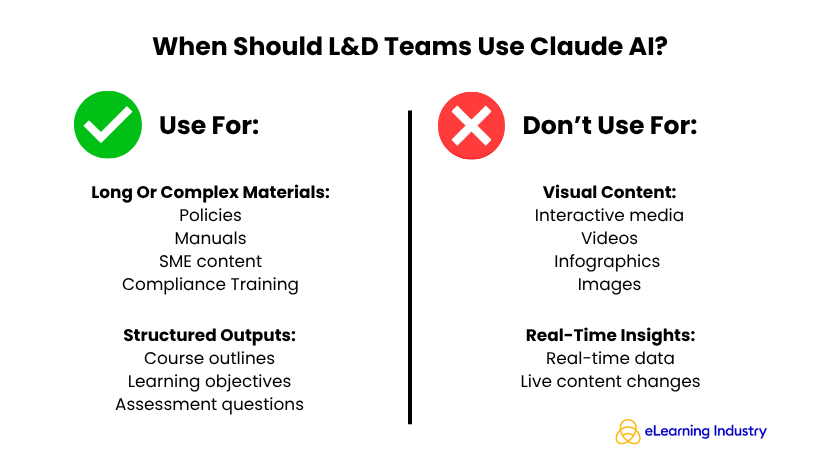
When Should L&D Teams Use Claude AI?
For L&D teams, knowing when to use Claude AI is more important than simply understanding what Claude AI is. This tool is particularly effective in environments where accuracy, structure, and scale matter.
Use Claude AI when:
- Working with long or complex materials. Its ability to process large documents makes it ideal for turning policies, manuals, or SME input into clear learning content. This is especially valuable in compliance training, where clarity and consistency are critical.
- Your team needs structured outputs. Course outlines, learning objectives, or assessment questions require organized, predictable results that align well with Instructional Design frameworks. Claude AI excels at that.
Don’t use Claude AI if:
- Your workflow depends on visual content. This includes interactive media, or video-based learning. In that case, other tools may be more suitable.
- You require real-time data or live integrations. Claude’s capabilities may feel limited in that aspect compared to other AI solutions.
Best Practices For Using Claude AI In Learning Content Creation
When integrating Claude AI into your Instructional Design workflow, following best practices ensures high-quality, actionable results.
Use Structured Prompts
Clearly define the role (e.g., Instructional Designer), the task (e.g., create a training module), and the expected output format. This helps Claude AI understand your objectives and produce content aligned with your needs.
Break Tasks Into Smaller Steps
This improves accuracy and relevance. For example, ask Claude AI to first outline a course, then draft individual lessons, and finally generate quizzes or discussion questions.
Validate Outputs With Experts
This ensures accurate information and appropriate teaching methods. Remember, Claude AI is a partner in creation, not a substitute, so human expertise is still crucial.
Combine Claude AI With Other Tools
You can combine Claude AI with LMS platforms or authoring software to streamline your workflow and maintain consistency across courses.
Sign Up And Experiment
For teams just starting, signing up for Claude AI and experimenting with it in small projects helps build confidence and familiarity. Over time, these practices allow L&D professionals to leverage Claude models effectively, creating learning experiences that are both efficient and high-quality.
Conclusion
Claude AI is more than just another chatbot. For Instructional Designers, it acts as a structured thinking tool, capable of handling complex learning content with depth and precision. It is best suited for professionals who need careful, detailed outputs rather than quick, superficial responses. Whether you are designing courses, assessments, or compliance training, Claude can help organize ideas, refine language, and ensure consistency. The real advantage is not simply using AI but understanding which AI tool fits each specific learning challenge and leveraging it strategically to enhance content quality and effectiveness.
Frequently Asked Questions (FAQ) About Claude AI
Claude AI is a conversational AI chatbot developed by Anthropic, designed for safe, structured, and long-form content generation. It helps professionals process complex documents, create learning content, and support decision-making in enterprise environments.
Claude AI is owned by Anthropic, an AI company founded by former OpenAI researchers, backed by major investors such as Amazon and Google.
Claude AI offers both free and paid tiers. The free version provides basic access, while premium plans offer extended capabilities, longer context windows, and API integration.
Claude AI excels at long-form content creation, structured document analysis, compliance and policy simplification, assessment generation, and other professional use cases in L&D and business environments.
Claude is optimized for safety, structured outputs, and handling long-context documents, making it particularly useful for Instructional Designers and corporate training. ChatGPT, on the other hand, often excels in broader conversational and creative tasks.
Claude AI is popular because of its safety-first design, long-context processing, and professional-grade outputs, making it a reliable tool for L&D teams, HR leaders, and content creators who need structured, trustworthy AI assistance.
Source link