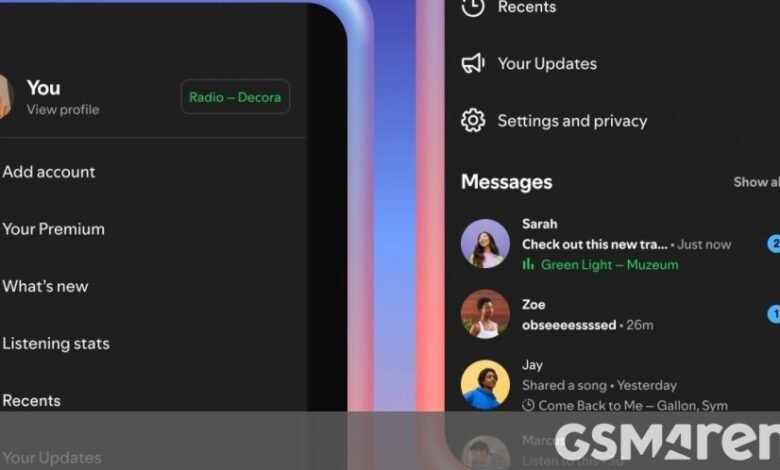
Spotify now lets you display what you’re listening to inside Messages in real time. This is called Listening activity and it’s opt-in, so it’s turned off by default. If you’re not actively listening, your most recent song will be shown instead. This is visible only to friends and family you’ve already connected with inside Messages on Spotify. You can see others’ activity even if you haven’t turned your own listening activity on, provided they have opted in.
To turn this on, go to the Privacy and social settings inside the Spotify app. Once enabled, activity appears in the chat row of the side drawer and at the top of chats in Messages. Only the contacts you choose can see your activity, and you can of course turn it off at any time. If you tap on a friend’s listening activity, you’ll be able to add those tracks to your library, listen to them, open the track’s context menu, or react with one of six standard emojis.
Request to Jam is a new way for you to invite friends you’ve connected to in Messages to join a live listening session. Jam has been available for a while, letting you listen with friends no matter where they are, but Spotify says “it can be hard to know when your friends are available to listen together when you’re apart”.
That’s where Request to Jam comes in, letting you see when someone is already listening, join them, and message in sync while listening. From a Messages chat in Spotify, if you’re a Premium user, you can tap Jam in the top right corner to send a request for a remote Jam. If your request is accepted, the recipient of the request becomes the host of the Jam session, and you can both add tracks to a shared queue and listen together.
You can of course leave a Jam whenever you want, and pending Jam invites will time out if they aren’t accepted within a few minutes. Both Listening activity and Request to Jam are rolling out to Spotify users in markets where Messages is available in Spotify, on both iOS and Android devices, and will broadly be available by early February. As hinted at before, only Premium users can Request to Jam, while Listening activity is available to all users.
Source link